
As I started building Docfix, I kept hearing that blogging is a great way to demonstrate thought leadership. That makes sense… but I don't love blogging. I like the in-and-out nature of technical documentation. I like helping people solve problems with immediate answers. Alternatively, Blogging needs to be interesting throughout. It requires a flavor of creative output that I've never considered a strength.
As much as I've tried to avoid it, blogging serves real purposes for a small agency like Docfix. It demonstrates expertise, educates an audience, and drives SEO/AEO. I am happy to have found Substack. It is a great tool for reaching people who want thoughtful, informative content. That said, it doesn't directly help my site's SEO/AEO performance.
The problem is that if I blog, I want all of the benefits of a blog. I want Substack posts for distribution, and posts on my own site for SEO/AEO. Which means I need an authoring workflow that doesn't require authoring everything twice.
Why Substack Authoring Won't Work
Substack's WYSIWYG editor is great. That said, getting content out of it and into clean HTML for my website is a pain. Any Substack authored content needs serious work before I can push it to my site.
Fortunately, the reverse works well. Substack handles copy-pasted HTML gracefully. So the better approach is to author outside of Substack and feed it HTML, rather than use Substack as the authoring tool.
Side Note - As I started to get excited about the possible automations, I realized that Substack doesn't have a public API for posting new content. Pushing drafts programmatically isn't really an option yet. It is disappointing, and I would love to see this change.
Markdown Is Still King
Ruling out Substack's authoring tool, I jumped straight to Markdown.
I like writing in Markdown. It's portable, lightweight, and there's no shortage of tools that convert it to HTML. Of those, Marked is a perfect fit as it is simple, fast, and it slots neatly into my existing Node setup. I can run it standalone or embed it into my full site build. Running it standalone is as simple as:
marked -i blog_post.md -o blog_post.html
Voilà, beautiful HTML for both Substack and my website.
Final Flow
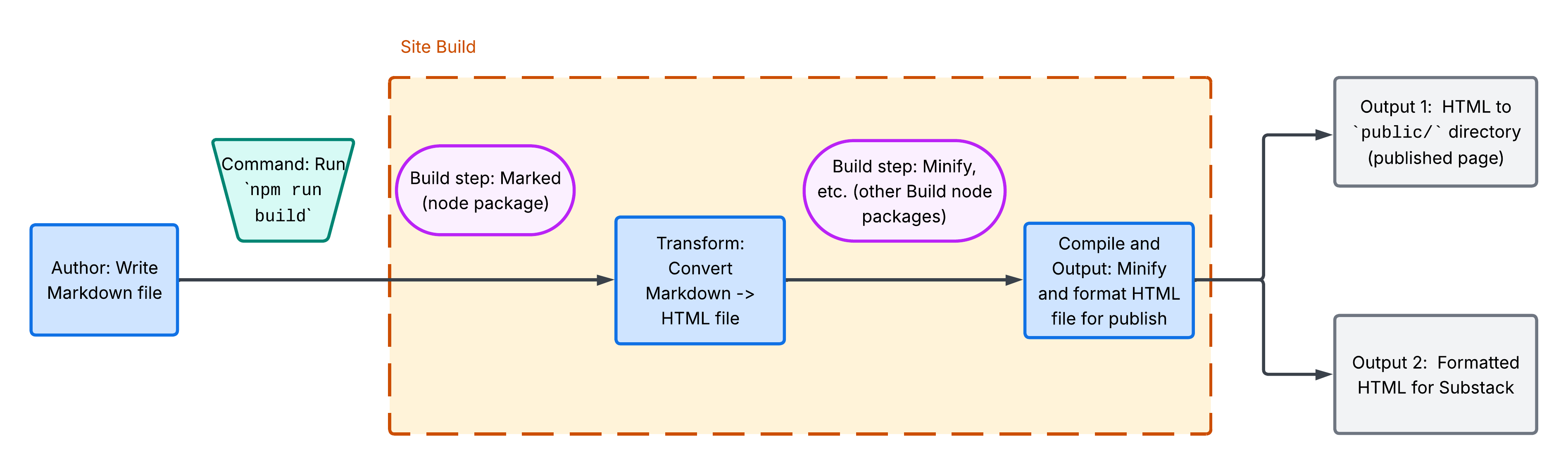
I write Markdown in Sublime Text, which is the same tool I use for coding and managing my website. Rather than running Marked manually each time, I've added it directly to my package.json build process so blog posts are generated automatically alongside everything else.
The result is a properly structured HTML file that lives exactly where it should in my file system, and can be copied and pasted directly into Substack when I'm ready to publish.
Automating Substack Posting
I really want my tooling to generate a draft in Substack. As mentioned, however, there isn't a public API or clever mechanism that allows me to access a draft after a build.
Further research surfaces two paths for automating Substack posts:
- Browser automation (Playwright or Puppeteer, for example)
- Undocumented internal APIs (libraries exist, but they're unofficial)
Both are technically possible, but the effort doesn't justify the instability. I also want to review posts in the Substack UI before anything goes live anyway. No need to overbuild here. I am happy with a copy/paste approach.
What's Still Unsolved
The HTML my build generates doesn't pick up any of my site's branding yet. I can easily inject the stylesheet reference, but the output is rough. I'm still working on the right approach (template wrapper, scoped CSS, or something else entirely).
Images are also an open question. For now the likely answer is simply copying them manually into the Substack UI at publish time. It isn't elegant, but it works.
Moving Forward
While still incomplete, this workflow seems perfect for an initial iteration. Plus, blogging still doesn't come naturally. This way I save some material for next time.